
Some prospects are worth more than an email. A video card is a premium card with a 7-inch screen inside: when your contact opens it, your video starts playing. No link to click, no phone to unlock, and no inbox to compete with. It’s the follow-up they show their colleagues.
Your note and a QR code are printed on an insert inside the card. We load your video, box the card, and ship it with tracking.
Step 1 — Start a card as usual #
- Choose a single contact, record or upload your video, and click Mail a card at the send step. (You can also click Mail a card on an email row in My Emails.)
- Under 1. Choose a card, pick a tile marked Video card. It says “A screen inside plays your video when it’s opened.”
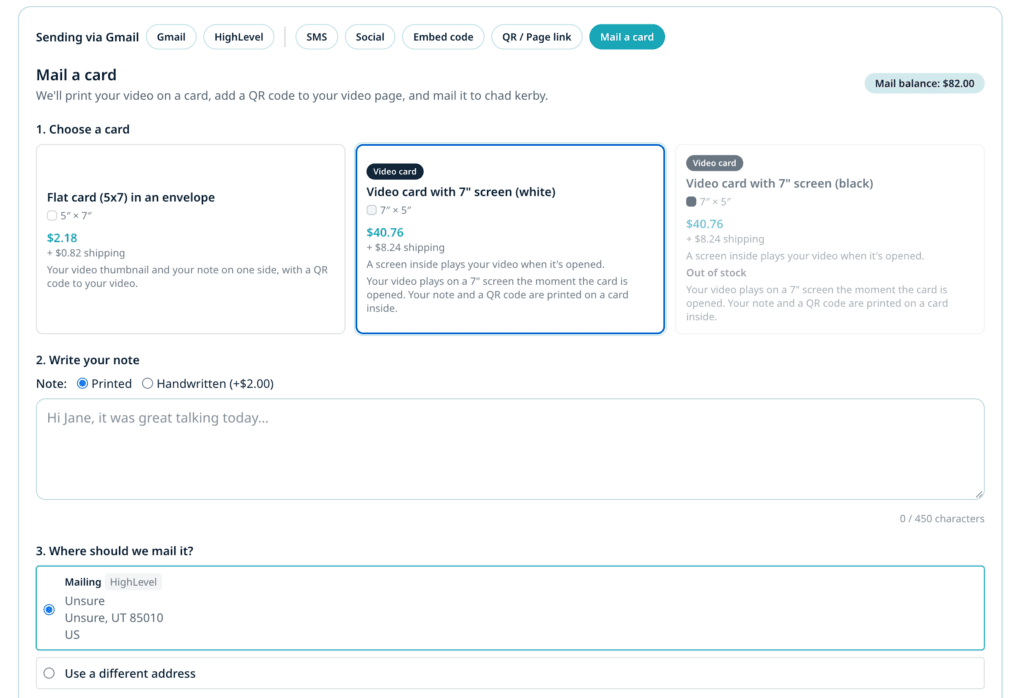
If a video card shows Out of stock, it can’t be ordered right now; check back soon or choose a printed card.
The full walkthrough for notes and addresses is in Mail a video card. Everything there applies to video cards too.
Step 2 — Choose where the QR code goes #
The insert carries a QR code. If your video has a call to action, you can choose what it opens under The QR code opens:
- Your call-to-action link: they’ve just watched your video on the card, so the code can take them straight to the next step, such as booking a call. A scan counts as a call-to-action click.
- The video’s watch page: they can rewatch, reply and see your call to action there. A scan counts as a card scan.
If your video has no call to action, the QR code opens the watch page.
Step 3 — Write your note, confirm the address and order #
- Write your note. It’s printed on the insert.
- Confirm the address under 3. Where should we mail it?
- Review the Summary. The card tile shows whether shipping is included (Postage included) or added as its own line (+ shipping).
- Click Mail this card.
Success check: You see your order number. We email you when the card ships.
Step 4 — Track the package #
Video cards ship in a box by ground, with tracking.
- Open My Emails → Mailed cards.
- When the card ships, its row shows the Tracking number and a Track your package link. You’ll also get an email with the tracking link.
Scans, plays, CTA clicks and replies show on the same row, just like a printed card. See Track mailed cards and automate follow-up.
Tips and best practices #
- Save video cards for the moments that matter: a stalled deal, a top-tier prospect, a thank-you to a new client, a referral partner.
- Talk to them as if you were in the room. The video plays the moment the card opens, so skip the “Hi, I’m sending this because…” and start with them.
- Use the call-to-action QR. Someone who just watched you on a screen in their hands is ready for the next step. Make it one scan away.
- Want your own branding on the card? You can order video cards with your own design printed on them. See Order custom card designs.
Troubleshooting #
Why does the video card take longer than a printed card? Each video card is loaded with your video by hand and shipped by ground in a box, so allow a few extra days.
There’s an extra fee line on my order. Some states charge an electronics recycling fee on devices with a screen. When one applies to the recipient’s address, it’s shown as its own line before you order.
Can I send a video card from the mobile app? Not yet. Video cards are available on the web app.
Will my long video fit? We format your video for the card’s screen and memory automatically, including any trim you made. If a video is too long to fit, our team will contact you before the card is made.


