
Sales teams / Video prospecting guide
Video prospecting: a practical guide for sales teams.
Video prospecting means reaching a prospect with a short video you recorded for them alone, instead of one more text email. Here’s when to use it, how to record one that gets watched, and how to turn views into meetings and revenue.
What is video prospecting?
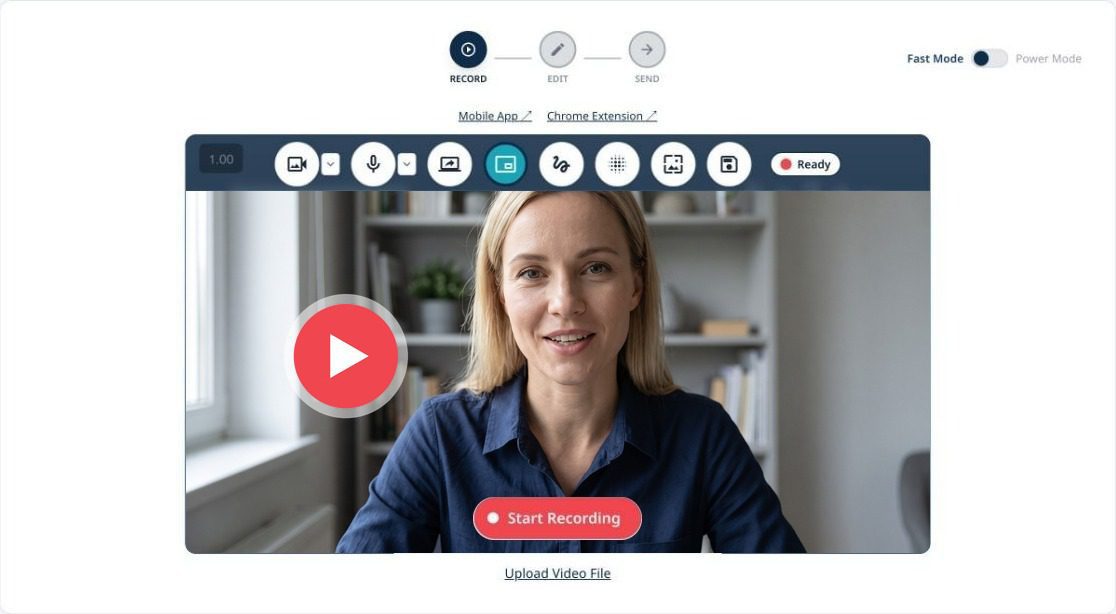
A rep records a 30 to 60 second video for one person, sends it the way they’d send any email, and follows up when it’s watched. It isn’t a marketing video or an AI avatar: it’s a real rep, talking to one buyer.
Record
Camera, screen or both, usually with the prospect’s website or LinkedIn post on screen so it’s obviously made for them.
Send
From the rep’s own inbox or the CRM, with a short note and an animated preview that makes the video easy to click.
Track
See who opened, played, watched to the end, clicked or replied, and when.
Follow up
Call while you’re on their mind, and let the CRM log the view and start the next step.
Why it works.
Buyers can spot automation in a line. A face and a voice saying their name can’t be faked by a sequence, and it shows you did the homework.
Buyers still want a person
69% of B2B buyers prefer to validate AI-generated insights with a sales rep (Gartner, May 2026). A video is the rep, without a meeting.
Personal beats generic
In randomized field experiments, adding nothing more than the recipient’s name to an email brought 31% more sales leads (Sahni, Wheeler and Chintagunta, Marketing Science, 2018). A video made for one person goes much further than a name.
Every touch has to count
B2B buyers spend only about 17% of their buying time meeting potential suppliers (Gartner, 2020). A short video respects that time: they watch when it suits them.
You learn who's interested
A text email tells you almost nothing until someone replies. A video tells you who played it, how far they got and whether they shared it.
Sources: Gartner, “Gartner Survey Finds 69% of B2B Buyers Turn to Sales Reps to Validate AI-Generated Insights,” May 2026; Gartner, “Gartner Says 80% of B2B Sales Interactions Between Suppliers and Buyers Will Occur in Digital Channels by 2025,” September 2020; Sahni, Wheeler and Chintagunta, “Personalization in Email Marketing: The Role of Noninformative Advertising Content,” Marketing Science 37(2), 2018.
When to use video in a sequence.
Not every touch needs a video. Use it where a text email would get lost, and leave the rest to text.
The first touch to a key account
When the account is worth ten minutes of research, a video shows you did it.
After a call
Recap what you agreed, on screen, with the next step linked below the video.
When a deal goes quiet
A 30-second check-in is easier to answer than a fourth “just following up” email.
When someone new joins the deal
Introduce yourself and the plan to the new stakeholder without booking another meeting.
Before a renewal or expansion
Thank the customer, show what they got from you this year, and propose what’s next.
How to record a video that gets watched.
Good prospecting videos are short, specific and have one ask. You don’t need a studio, a script you read word for word, or more than one take.
Step
What to do
1. Prepare in a minute
Skim their website, LinkedIn and your CRM notes, and pick one reason you’re reaching out. coReel’s AI briefing summarizes the contact’s CRM history and suggests a script before you record.
2. Open with them
Say their name and something specific to them in the first few seconds, with their website or post on screen behind you.
3. Keep it under a minute
Thirty to sixty seconds: who you are, why them, and what you’re asking for.
4. Make one ask
Book a short call, look at one page, or reply. One clear next step beats three options.
5. Record once
Small stumbles make it feel real. Re-record only if you got their name or company wrong.
Want words to start from? See three scripts for a first touch, after a call and when a deal goes quiet in our video prospecting playbook.
How to send it.
The email around the video decides whether it gets opened and played.
Send from your own address
Video from a rep’s real Gmail or Outlook address, or from the CRM as the rep, reads like a personal email, and replies come back to them.
Write a subject a person would write
Short and specific, like their company and the reason: “Northwind onboarding idea”. Skip “video for you”.
Use an animated preview
A moving preview of you, with their name on it, makes the video obvious and easy to click.
Add two lines of text
Say why you recorded it and what’s in it, so the email still works if they don’t press play.
Put the ask on the watch page
One button for the next step, such as booking a call, right where they finish watching.
Follow up and measure.
The video is the start of the conversation. What you do in the next hour matters more than the video itself.
Act on the view
Get an alert when they play it, and call or reply while you’re on their mind.
Log it in the CRM
Every send, view and reply should land on the contact record, so the team sees it and workflows can follow up.
Track the right numbers
Plays and watch-through tell you the video landed. Replies and meetings booked tell you it worked.
Tie it to revenue
The question a sales leader asks is which videos turned into deals. coReel’s conversion webhooks credit a closed deal in your CRM to the exact video send that started it.
Mistakes to avoid.
Most video prospecting that fails, fails for the same few reasons.
Talking about yourself
If the first ten seconds are about your company, they’ve stopped watching. Start with them.
Going long
A three-minute pitch belongs in a meeting. Keep the prospecting video under a minute.
One video for everyone
A generic video sent to a list is just marketing with your face on it. Record for one person.
No next step
End with a single, specific ask, and put it on the watch page too.
Not following up
A view is a signal. If nobody acts on it, the video was wasted.
Video prospecting, answered.
What is video prospecting?
Video prospecting is reaching out to a prospect with a short, personal video recorded for them, usually sent by email from the rep’s own inbox or from the CRM. It works because a real person saying the prospect’s name can’t be mistaken for automation.
How long should a prospecting video be?
Thirty to sixty seconds. Long enough to say who you are, why them and what you’re asking for; short enough to watch between meetings.
Should a video go in the first email of a sequence?
For key accounts, yes: it shows you did the research. For everyone else, save it for moments a text email tends to get lost, such as after a call or when a deal goes quiet.
Do I need special equipment?
No. A laptop camera or a phone in decent light is enough. Background blur or a virtual background helps if your space is busy.
Can I use AI avatars for video prospecting?
Some tools generate avatar or voice-cloned videos at scale. Buyers often notice, and it removes the thing that makes video work: a real person. coReel keeps the rep on camera and uses AI to help them prepare instead.
How do I measure video prospecting?
Watch plays and watch-through to see that videos land, then replies and meetings booked to see that they work. To show revenue, connect video sends to closed deals in your CRM; coReel does this with conversion webhooks on its Teams and Enterprise plans.
Keep going.
Compare the best video prospecting tools in 2026, see how coReel works with HubSpot and Salesforce, see how to send a video email in Gmail, add video to HubSpot emails or log video views in Salesforce, see how Loom works for sales, or start free with 25 videos a month.